
Home / Blog / FL Studio vs Ableton Live: how the two actually differ
FL Studio vs Ableton Live: how the two actually differ
Both can take a blank project to a finished, released track. The real differences are workflow philosophy, genre culture, and what an extra £130 to £340 actually buys you.
Some links below are affiliate links. We may earn a commission if you sign up or buy through one, at no extra cost to you. See our privacy policy.
Pick FL Studio if you think in drum patterns and want to program a beat fast. Pick Ableton Live if you think in loops you want to jam, layer and perform live. Records have charted that were made entirely in either one; the real difference between them is workflow philosophy and the culture that grew up around each, not audio quality.
Quick verdict
Programming drums and 808s for hip-hop, trap or pop, or you just like a fast, click-and-play way of writing: FL Studio fits. Writing by jamming loops, performing live, or working in techno, house or ambient: Ableton Live fits better. Neither is the more professional choice; they're built around different ways of starting a track.
Where each one came from
FL Studio started as FruityLoops, first released on 18 December 1997 by 19-year-old Belgian programmer Didier Dambrin for Image-Line, the company Jean-Marie Cannie and Frank Van Biesen had just founded. When Image-Line tried to trademark the FruityLoops name in the US, Kellogg's objected, and the software was renamed FL Studio at version 4. Dambrin later said he'd always intended the initials to read as "Eiffel Studios" anyway.
Ableton was founded in Berlin in 1999 by Gerhard Behles, Robert Henke and Bernd Roggendorf. Behles and Henke were also Monolake, a minimal techno duo signed to Basic Channel's Chain Reaction label, and the software that became Live grew out of tools they built to perform their own techno sets, not a product designed on a whiteboard first. Live 1.0 launched at Frankfurt's Musikmesse trade fair on 30 October 2001, built around Session View, a genuinely new way of triggering and layering loops that didn't exist in any other DAW at the time.
The core difference: Playlist vs Session View
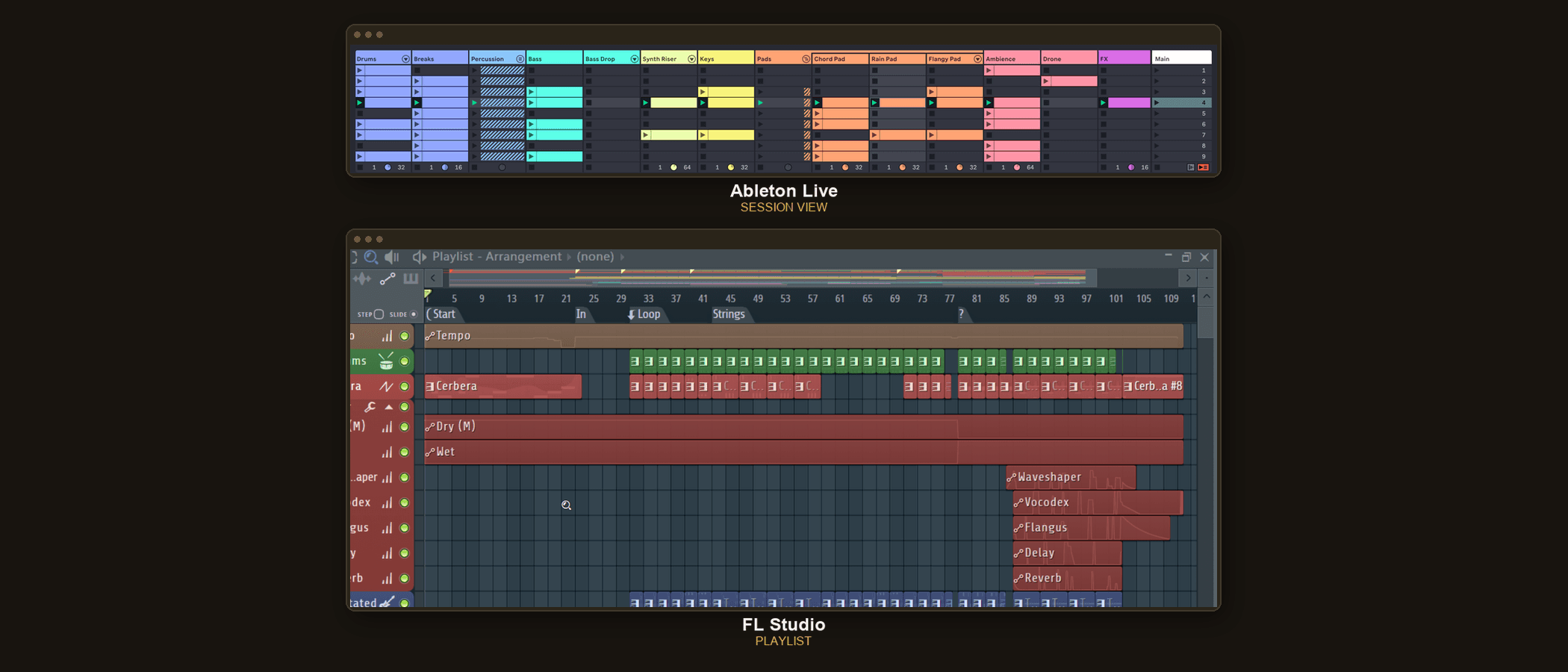
FL Studio's Playlist is pattern-based but arranged left to right like a timeline from the moment you open it. You build a pattern in the Channel Rack step sequencer or the Piano Roll, drop that pattern block into the Playlist, then stretch and repeat it along a timeline. It's arrangement-first: what's on screen resembles a finished song structure almost immediately.
Ableton's Session View has no fixed timeline at all. It's a grid of clip slots, each holding a loop, that you trigger in any order, live, layering and swapping ideas as you go, closer to how a DJ thinks than how a composer starting from bar one thinks. Once an idea works, you record it into the separate Arrangement View underneath, which is a standard left-to-right timeline, to turn the jam into a finished, produced track. Live genuinely has two distinct windows for two different modes of working; FL Studio uses one continuous workspace for both.
Channel Rack and Piano Roll vs Drum Racks and clips
FL Studio's Channel Rack inherited its "click and play" step sequencer directly from FruityLoops' drum-machine roots, and it's still the fastest way to program a drum pattern in either DAW. Metro Boomin, an FL Studio user since he was 13, produced Future's "Mask Off" and Drake and Future's "Jumpman" in it; melodics.com credits FL Studio's Piano Roll specifically for making the complex hi-hat rolls and 808 slides that define his sound easy to build. Producers including Southside and Lex Luger are named in the same piece as long-time FL Studio users for similar reasons.
Ableton's equivalent is the Drum Rack, a pad-based instrument that maps one sample per pad and feeds straight into the same clip-launching grid as everything else, so a performer can swap an entire drum kit without leaving Session View. Its MIDI tools lean towards performance too: built-in scale locking and an Arpeggiator device are built to be played and automated while a track runs, rather than programmed once and left alone.
Editions, pricing, and what actually changes between them
| FL Studio | Ableton Live | |
|---|---|---|
| Price range | £89 to £469 | £69 to £599 |
| Entry tier includes | Fruity: MIDI only, no audio recording | Intro: 16 tracks, 8 instruments, no Max for Live |
| Top tier includes | All Plugins: every current Image-Line plugin | Suite: 20 instruments, 71GB+ sounds, Max for Live included |
| Future major versions | Free for life once you own an edition | Paid upgrade, roughly $79 to $429 depending on edition |
FL Studio is a genuine buy-once deal: pay for an edition and every future update to it, including new major version numbers, stays free. Ableton charges for major version upgrades instead: moving from Live 11 to Live 12 cost existing Standard owners around $159 to stay on Standard, or roughly $429 to jump straight to Suite. Minor updates within a version are free on both.
They also differ in how far you can customise them. Max for Live, bundled with Suite or available as a paid add-on to Standard, is a visual programming environment for building genuinely new instruments and effects from scratch, rather than only combining existing ones. FL Studio's closest tool, Patcher, does something narrower: it chains and routes plugins you already own into complex, reusable effect and instrument setups, useful for building custom presets, but it can't create a new synthesis engine or effect algorithm from scratch the way Max for Live can.
Hardware built specifically for each one
Ableton released Push with Akai in March 2013 for Live 9: a 64-pad grid built to launch Session View clips and play instruments by hand instead of by mouse. Push 3, released in 2023, can run Live entirely on its own hardware without a laptop attached.
Image-Line partnered with Akai on the same idea for FL Studio: the Fire controller, announced in September 2018, puts a 4x16 velocity-sensitive pad matrix in front of the Step Sequencer for fast pattern input, with a separate Performance Mode for playing and launching patterns live. Both companies cared enough about their own core workflow to co-design dedicated hardware around it, which says something about how central Session View and the Step Sequencer are to each one's identity.
The genre culture each one grew up in
FL Studio's association with hip-hop and trap production is well documented: Metro Boomin, Southside and Lex Luger have all named it as their main beat-making tool, and the Step Sequencer's speed at building 808 patterns and hi-hat rolls is a specific, named reason why. Ableton's association runs the other way, towards live electronic performance and DJ sets, largely because Session View and Push were built from the start for triggering loops in front of an audience rather than composing alone in a studio.
Neither association is a rule you have to follow. As our piece on gear not making you a better producer argues about tools generally, the DAW someone used to make a hit tells you about their workflow, not a requirement for making music in that genre.
Which one to actually pick
- Choose FL Studio if fast drum and pattern programming is your main need, you want a simple buy-once cost with no future upgrade fees, or you're making hip-hop, trap, pop or other pattern-based genres.
- Choose Ableton Live if you plan to perform live or DJ with your own productions, you write by jamming and layering loops rather than starting from a grid, or you want Max for Live's deeper customisation down the line.
- Stay undecided and try both. Per our DAW guide, FL Studio's trial is unlimited in time and Ableton offers a 90-day free trial, both genuinely full-featured rather than crippled demos.
Can FL Studio do live performance the way Ableton can?
Not as naturally. FL Studio lacks Session View's built-in non-linear clip launching, though its Performance Mode and the Akai Fire controller cover some of the same ground. Ableton was built around live, non-linear triggering from its very first version.
Is Ableton Live harder to learn than FL Studio?
Not inherently, but it asks you to understand two separate views, Session and Arrangement, instead of one continuous workspace, which trips up complete beginners more often than FL Studio's single-window Playlist does.
Which is cheaper, FL Studio or Ableton Live?
At the entry tier, Ableton's £69 Intro edition undercuts FL Studio's £89 Fruity edition, but Intro drops the audio recording most people need to finish a track. At a genuinely comparable full-featured tier, FL Studio's £199 Producer edition undercuts Ableton's £259 Standard, and FL Studio never charges for future major versions, while Ableton does.
Do professional producers actually use FL Studio?
Yes, at the highest level. Metro Boomin has used FL Studio since he was 13 and produced Future's "Mask Off" and Drake and Future's "Jumpman" in it, alongside producers like Southside and Lex Luger who are also long-time users.
What is Max for Live, and does FL Studio have an equivalent?
Max for Live is a visual programming environment, bundled with Ableton Live Suite, for building entirely new instruments and effects. FL Studio's Patcher looks similar but only chains and routes plugins you already own; it can't create a new synthesis engine or effect algorithm from scratch the way Max for Live can.
Can I use Ableton's Push controller with FL Studio, or Fire with Ableton?
No. Both are built to work specifically with their matching software: Push is designed around Ableton's Session View, and Fire is designed around FL Studio's Step Sequencer and Performance Mode.
Sources
Every price and fact above traces to a school or platform's own site, dated on its own listing page. See the methodology for how that works.
- weraveyou.com: FL Studio turns 28
- MusicRadar: 20 years of Ableton Live
- Ableton: Live 12 editions and pricing
- image-line.com: FL Studio pricing
- melodics.com: what DAW does Metro Boomin use
- Ableton: Max for Live
- Audeobox: how to use Patcher in FL Studio
- Ableton: the evolution of Push
- Akai Pro: Fire FL Studio controller announcement
- Ableton Help Center: Live upgrade FAQ